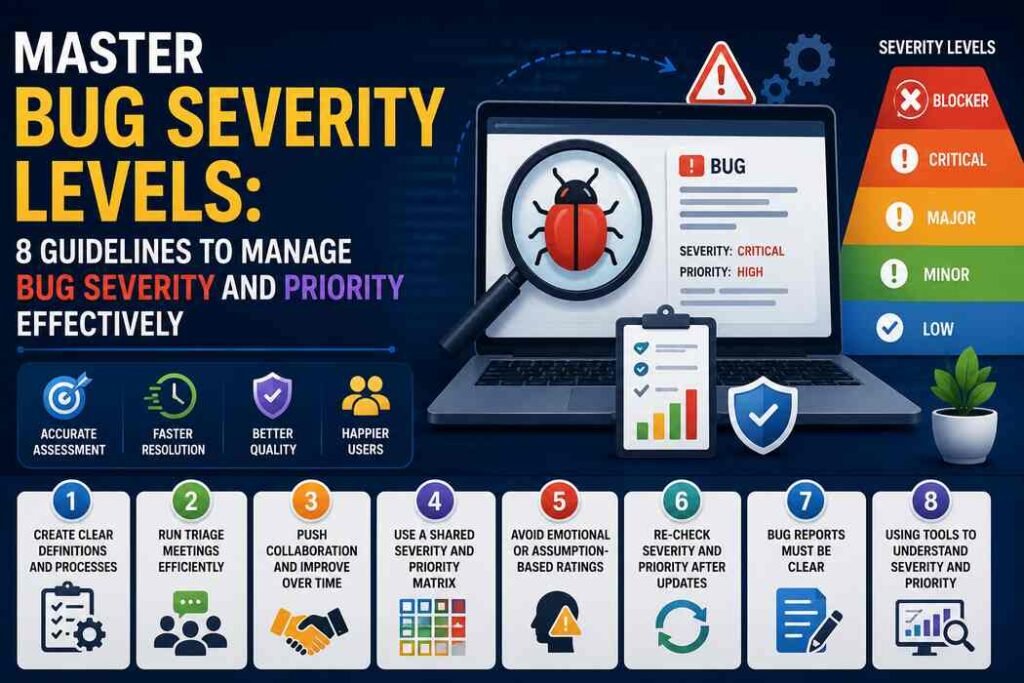

Software testing teams might bump into a lot of problems, yet not every problem has to be treated the same or even close. Some more severe defects can kinda break the application entirely, and they usually need attention right away, like in a priority sequence. On the other hand, smaller UI/UX annoyances, such as faint visual glitches, are low-priority bugs that most users do not really notice, or they just move on.
Teams end up being the ones to judge the intensity of a defect, so they can decide when and how it should be fixed. But if they can’t reach a clear call on it, the whole workflow slows down, product quality drops, and then users start filing support tickets. Testers typically rely on a structured approach to make sense of bug severity levels so they can figure out how fast each item should be handled.
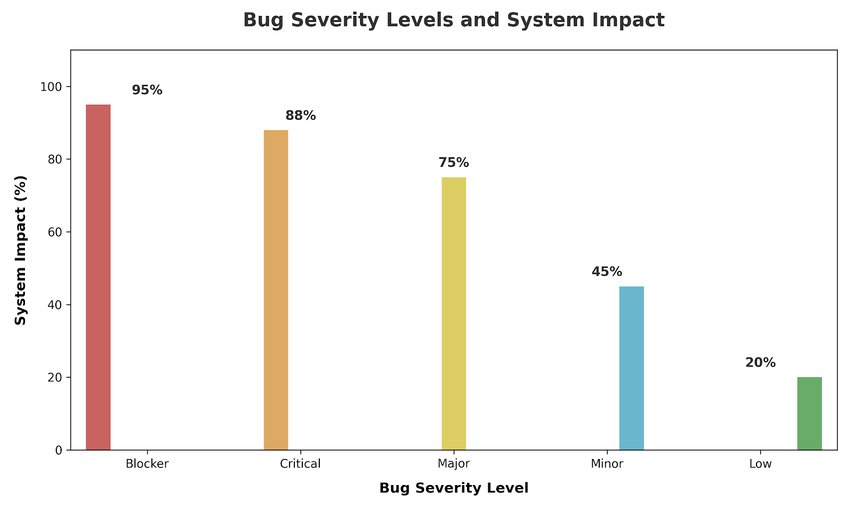
Severity, in a way, tells teams how much a defect really reaches into the system. Once severe issues start being fixed first, the testing part feels a lot more straightforward, and stakeholders get better visibility into what risks are brewing.
To keep things orderly and make the planning run more smoothly, you really need to manage bug severity along with priority. When all testers follow the same guidelines for classifying issues, developers have an easier time sorting them out, too, because they can see which defects need attention first, without guesswork.
8 Best Guidelines to Manage Bug Severity and Priority
1. Create clear definitions and processes, for real
Every team should use the same rules and a sort of pathway to steer severity, plus priority levels for bugs. All defects get classified in the same manner, so nothing drifts. They can call severity levels Blocker, Critical, Major, Minor, and Low, just in straightforward terms, and then do the same thing for priority using High, Medium, and Low. After that, they report the results using a standard bug report template every time.
2. Run triage meetings that actually stay efficient
Triage sessions let the team look at new defects and then decide the right severity and priority. Usually, QA leads, or QA runs with developers, and product managers join, because these short meetings happen regularly. The goal is to land on decisions about real impact, user needs, and release timelines. With regular triage, there’s less chance that something gets missed or judged wrong, even if it looks small at first.
3. Push collaboration, and keep improving over time
Severity and priority classification work better when QA and product teams talk openly and often. QA zooms in on technical impact while product teams check business urgency. Both angles matter; the choice can feel a bit off. These classifications should be revisited when deadlines shift or when defects start to spread. If needed, a workaround can be applied temporarily to help users keep going, while a proper, complete fix is planned.
4. Use a Shared Severity and Priority Matrix
A simple severity–priority matrix helps everyone sort out how each level should be handled. It’s pretty much like a requirements traceability matrix, but not fully the same, you know. When this chart is visible on the sprint board or in documentation, team members can easily follow the same rules, reducing confusion and keeping those classifications consistent.
5. Avoid Emotional or Assumption-Based Ratings
Pick the severity and priority level based on the actual impact, not on the assumption of how bad a defect looks. Make fact-based choices by looking at the technical depth, the user disruption, or the business risk. Don’t guess, don’t “tune” the levels because an issue is rarely seen, or because of personal preferences that happen to stick.
6. Re-check Severity and Priority After Updates
If you try to fix something about the bugs, it will absolutely change how a defect behaves, sometimes in ways you didn’t expect. The bug can also spread from one page to another and affect more areas, which in the end will increase the severity. It’s better to regularly re-check and review how the bugs are behaving, and how the system is performing overall.
7. Bug Reports Must be Clear
Make bug reports clear and a bit simple too, so developers can understand them quickly and fix the issue faster. Try to include all the important bits from the steps, right up to the expected results, because if it is not there, confusion shows up, and it becomes hard to trace the problem.
8. Using Tools to Understand Severity and Priority
You can use testing tools that help you estimate severity and priority, using fairly consistent rules. These tools help reduce mistakes and also keep everything neat and organized.
Bug Severity Levels and System Impact
Conclusion
It matters a lot that teams understand bug severity and priority properly. That clarity helps them streamline their tasks and ship better quality software. Also, knowing the level of impact and what priority means in practice, like how urgent it is to fix, helps the team decide with less friction and fewer misunderstandings.
Modern systems can run into technical issues even on high-end setups, like unpredictable AI behavior, security risks, and automation gaps. Still, the workflow stays the same, because you only need to judge the damage and the urgency, then respond accordingly.
Frequently Asked Questions (FAQs)
What is the bug severity rating?
A bug severity rating is used by software testers to measure how much effect a bug has on the technical functioning of a software system.
What is the defect severity level, and how does it differ?
A defect severity level is a label that tells us about the nature and intensity of a bug, which impacts our system’s functionality or user experience. The main bug severity levels include Major, Minor, Blocker, Critical, and Trivial.
What are the 4 levels of software testing?
The 4 levels of system testing are unit that tests every component, integration tests the working of modules, system testing tests the complete system activity, and acceptance testing, which checks if the system is meeting business and user requirements.