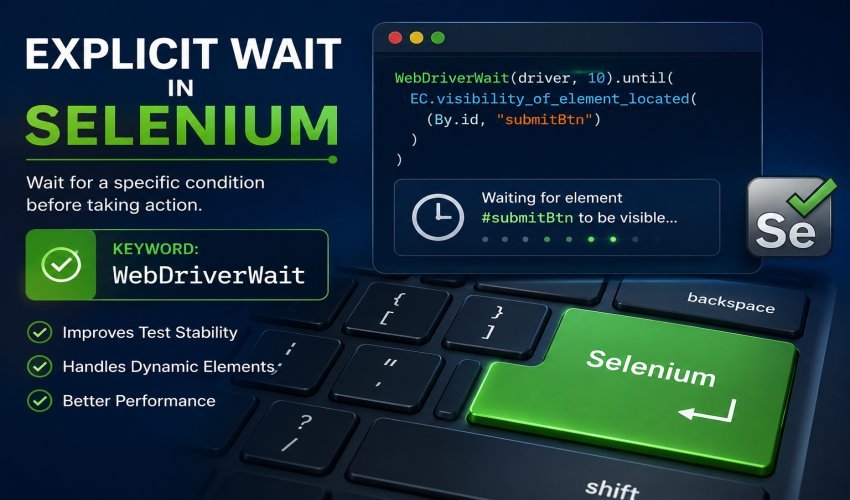

Selenium is a widely used and respected automated testing tool designed to assist you in writing automated tests for web applications. Many web applications now have portions that are loaded dynamically; therefore, automation scripts will sometimes attempt to click and/or type before the page has finished loading (even if you think it has). This is where the use of explicit waits in Selenium becomes an extremely important and valuable feature of the tool. Explicit waits allow automated test scripts to wait or pause until a specific condition is met before executing their programming, thereby making the entire testing process more reliable and efficient.
When using the fixed time delay (for example, using a hard sleep), you are required to wait for that specific amount of time regardless of whether or not the condition is met. With explicit waits, you are able to wait only as long as is necessary until the condition you are monitoring is found. So, if a condition is met before the maximum time allowed has elapsed, Selenium will stop waiting, and your test will continue to execute without wasting any additional time. Therefore, using explicit waits can improve your test execution time while also reducing the chance of a failure due to having to use slow-loading web elements that are not fully loaded yet.
What is an Explicit Wait in Selenium?
Explicit wait is an approach to synchronization in Selenium, allowing Selenium to wait until a particular condition is met. Explicit wait only focuses on one specific event or element rather than waiting for the entire page to finish loading. Explicit waits are ideal for use on dynamic web applications because they capture events (for instance, pop-ups, image loads, button clicks, form submissions) that may happen after a short time on your browser.
Testers use explicit waits to ensure that an element is present, clickable, and visible (available and ready for interaction) before interacting with the element. As a result of using explicit waits, testers are decreasing the number of times there is an occurrence of common problems, such as an element not being detected or an action occurring before the user interface is ready.
The Significance of Explicit Wait In Selenium
The use of explicit wait in Selenium automation brings multiple advantages, particularly with regard to the stability of your tests; when using explicit waits, Selenium waits for an element to actually be ready before attempting to click, type, or otherwise interact with it. This is a much more dependable method of synchronizing actions with the performance of an element than using a fixed delay, which can be either too short (less likely to work) or excessive (unproductive), so, generally speaking, the automated run will complete quicker with much less potential for flakiness.
The other significant benefit of using explicit wait is that it makes your test scripts much easier to maintain and is more adaptable to changes in network conditions or temporary reductions in the performance of the application. If a page loaded quickly initially and at a later time started to lag, explicit wait would provide a way of synchronizing actions with the element without changing the test script. Therefore, regardless of whether the page is very responsive or is experiencing performance issues at the moment, you will receive the same results each time you run the test.
At What Point Should You Use Explicit Wait?
An explicit wait is required when the UI is dynamic (sometimes UI elements show up after JavaScript has completed executing its “job”). Explicit Wait is essential when you are working with the new JavaScript model/platforms since elements may not appear right away when either a server completes its job and/or when waiting for user input.
You may want to use an explicit wait for the following: Login pages, Search results pages, modal windows, loading animations, and Forms where action must take place. These scenarios typically require that Selenium pause until a defined condition has been met (not just waiting for some time) before performing the next action, which will occur when something significant has officially (as defined by the defined condition in the wait method) occurred or finished.
Explicit Wait Best Practices
When automating your tests, consider using explicit waits only when necessary for synchronizing or troubleshooting rather than adding unnecessary delay times throughout your test scripts. Waiting for meaningful conditions is generally preferable to waiting for arbitrary amounts of time, which usually results in faster execution times and makes it much easier to read the code when reviewing after execution.
Your specified timeout durations should also reasonably reflect how long you anticipate it will take for your application to respond to requests. Avoid using timeout durations that are too short or too long and instead choose sensible values that are aligned with your application’s expected response time. Using both explicit waits and well-designed test cases makes your entire environment much more reliable, maintainable, and ultimately better performing overall.
Frequently Asked Questions (FAQs)
What is meant by Explicit Wait in Selenium?
Explicit wait is an approach to synchronization in Selenium, allowing Selenium to wait until a particular condition is met. Explicit wait only focuses on one specific event or element rather than waiting for the entire page to finish loading. Explicit waits are ideal for use on dynamic web applications because they capture events (for instance, pop-ups, image loads, button clicks, form submissions) that may happen after a short time on your browser.
What is the significance of an explicit wait in Selenium?
The use of explicit wait in Selenium automation brings multiple advantages, particularly with regard to the stability of your tests; when using explicit waits, Selenium waits for an element to actually be ready before attempting to click, type, or otherwise interact with it. This is a much more dependable method of synchronizing actions with the performance of an element than using a fixed delay, which can be either too short (less likely to work) or excessive (unproductive), so, generally speaking, the automated run will complete quicker with much less potential for flakiness.