

Software can look perfect on the surface and still contain serious problems underneath. A button may work, a page may load, and individual functions may return the right results. Yet, when those parts communicate with each other, something can go wrong.
For example, an online store may correctly calculate an order total in one function. The database may also work correctly on its own. The payment service may also be working. But what happens when the customer places an order and all three systems have to work together?
This is where software testing becomes especially important.
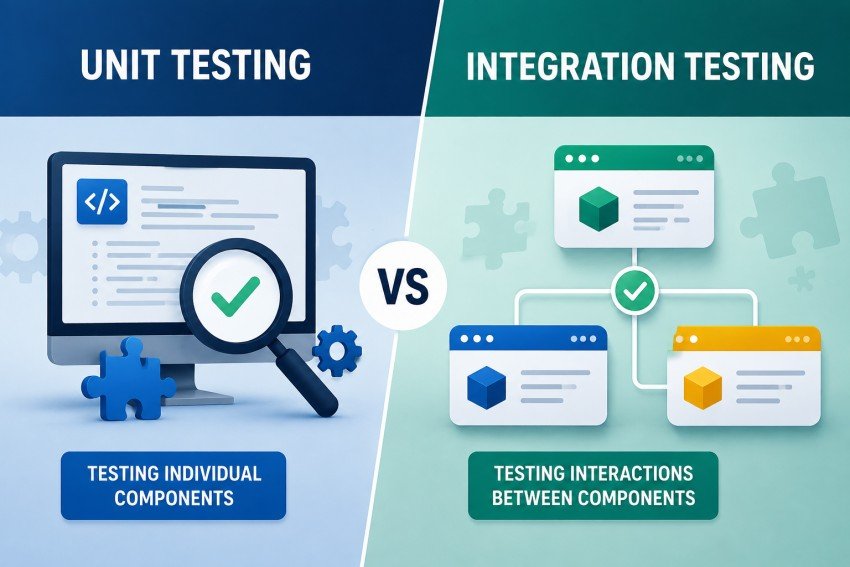
Two of the most important testing methods developers use are unit testing and integration testing. Both help find bugs, but they look at software from different angles. Unit testing checks small pieces of code independently, while integration testing checks whether multiple pieces work correctly together.
Understanding the difference can help development teams create better test suites, find bugs earlier, and release software with greater confidence.
In this guide, we will explore Integration Testing vs Unit Testing, including their differences, benefits, limitations, practical examples, tools, testing strategies, and roles in modern CI/CD workflows.
What Is Unit Testing?
Unit testing is a software testing method that checks the smallest testable parts of an application separately.
A “unit” might be:
- A function
- A method
- A class
- A small business rule
- A calculation
- A validation function
The goal is simple: make sure one piece of code behaves correctly under different conditions.
For example, imagine an online shopping application has a function that calculates the total price of an order.
def calculate_total(price, quantity, tax):
    subtotal = price * quantity
    return subtotal + (subtotal * tax)
A unit test could check whether the function returns the correct result:
def test_calculate_total():
    result = calculate_total(100, 2, 0.10)
    assert result == 220
This test does not need a real database, payment gateway, or web browser. It focuses only on the calculation.
That isolation is one of the biggest strengths of unit testing.
How Unit Testing Works
A typical unit test follows a simple process:
- Prepare the required input.
- Run the unit being tested.
- Compare the result with the expected result.
- Report whether the test passed or failed.
Developers often use mocks, stubs, or other test doubles when the unit normally depends on another service.
For example, suppose a function sends an email after a user registers. During a unit test, developers may replace the actual email service with a mock.
This allows them to test the application’s logic without actually sending an email.
Why Unit Tests Are Usually Fast
Unit tests generally have very few external dependencies.
They normally do not need to:
- Connect to a production database
- Send network requests
- Start a browser
- Call a third-party API
- Wait for an external service
Because of this, a well-designed unit test can often run extremely quickly.
Fast tests are valuable when developers run hundreds or thousands of tests during development and continuous integration.
Benefits of Unit Testing
Unit testing offers several important advantages.
1. Bugs Are Found Early
A developer can discover a problem immediately after changing a function instead of waiting until the entire application is tested.
Early feedback reduces the cost and effort of fixing defects.
2. Tests Are Easy to Repeat
Because unit tests are isolated, developers can run them repeatedly with predictable results.
This is especially useful during refactoring.
3. Debugging Is Easier
If a unit test named test_discount_for_premium_customer fails, the developer already has a strong clue about where the problem may be.
With larger tests, the source of failure can be harder to identify.
4. Refactoring Becomes Safer
Developers often need to improve code without changing what it does.
A strong unit-test suite can provide quick feedback after a refactor.
5. They Encourage Better Code Design
Code that is difficult to unit test may have too many responsibilities or dependencies.
Writing testable code can encourage smaller, cleaner components.
Limitations of Unit Testing
Unit testing is powerful, but it cannot prove that the entire application works.
A unit test may confirm that:
calculateTotal() = correctAnother test may confirm:
saveOrder() = correctAnd another may confirm:
paymentRequest() = correctBut these tests do not necessarily prove that the complete order process works.
For example, the application might send the wrong database field to the order service. Every individual unit could pass while the complete workflow fails.
This is one reason integration testing is necessary.
Common Unit Testing Frameworks
The framework usually depends on the programming language.
| Language | Common Unit Testing Tools |
|---|---|
| Python | pytest, unittest |
| Java | JUnit |
| JavaScript | Jest, Vitest |
| TypeScript | Jest, Vitest |
| C#/.NET | xUnit, NUnit |
| Ruby | RSpec |
| PHP | PHPUnit |
| Go | testing package |
The framework is important, but the quality of the tests matters more than simply choosing a popular tool.
A good unit-testing strategy should focus on meaningful behavior, edge cases, and maintainability.
What Is Integration Testing?
Integration testing checks whether multiple parts of an application work correctly when they interact with each other.
Instead of testing one function in isolation, an integration test examines the communication between components.
For example, an e-commerce application might contain:
Customer
   ↓
API
   ↓
Order Service
   ↓
Database
   ↓
Payment Service
A unit test might test the order calculation separately.
An integration test could test whether the API correctly sends the order information to the order service and whether the resulting order is stored correctly in the database.
The purpose is to discover problems that isolated unit tests cannot see.
A Practical Integration Testing Example
Imagine a customer submits this request:
POST /orderswith:
{
  "product_id": 25,
  "quantity": 2
}
An integration test could verify that:
- The API accepts the request.
- The request reaches the correct controller.
- The application retrieves the product.
- The price is calculated correctly.
- The order is inserted into the database.
- The API returns the expected status code.
- The stored order contains the correct total.
This test covers several components at the same time.
It therefore provides a different type of confidence from a unit test.
What Problems Can Integration Tests Find?
Integration testing is especially useful for finding problems such as:
- Incorrect API contracts
- Database connection problems
- Incorrect database queries
- Serialization errors
- Authentication configuration problems
- Incorrect environment variables
- Service-to-service communication failures
- Broken message queues
- Incorrect data mapping
- Configuration mismatches
For example, a function may correctly create a user object.
But an integration test may reveal that the database expects the field user_email while the application sends email_address.
The individual pieces may appear correct, but the integration fails.
Integration Testing Approaches
There are several ways teams can approach integration testing.
Big-Bang Integration Testing
In a big-bang approach, many or all components are integrated before testing the complete system.
Advantages
- Simple concept
- Useful for small systems
- Requires less incremental integration planning
Disadvantages
The biggest problem is debugging.
If five components are integrated and a test fails, identifying the exact source of the failure can take time.
For larger applications, this approach can become difficult to manage.
Top-Down Integration Testing
Top-down integration starts with higher-level components and gradually integrates lower-level components.
When a lower-level component is not ready, a stub can temporarily represent it.
For example:
User Interface
      ↓
API Layer
      ↓
Business Service
      ↓
Stub Database
The team can gradually replace the stubs with real components.
Bottom-Up Integration Testing
Bottom-up integration starts with lower-level components and gradually moves toward higher-level functionality.
For example:
Database
   ↑
Repository
   ↑
Service
   ↑
API
Drivers may be used to simulate higher-level components while lower-level components are being tested.
Incremental Integration Testing
Many modern teams prefer incremental integration because problems can be isolated more easily.
Instead of connecting everything at once, developers integrate a few components, test them, fix problems, and then continue.
This creates a controlled testing process.
Unit Testing vs Integration Testing: Key Differences
The easiest way to understand the difference is to compare what each test is trying to prove.
| Factor | Unit Testing | Integration Testing |
| Main purpose | Verify individual components | Verify interaction between components |
| Scope | Small | Larger |
| Dependencies | Usually mocked or isolated | Often real or near-real |
| Speed | Usually very fast | Usually slower |
| Database | Normally avoided | Frequently included |
| Network | Usually avoided | May be included |
| Debugging | Usually easier | Can be more complex |
| Main focus | Internal logic | Communication and behavior |
| Typical author | Developer | Developer or QA engineer |
| CI/CD role | Fast feedback | Deeper validation |
| Failure location | Often easier to identify | May require investigation |
| Best use | Logic and edge cases | Interfaces and workflows |
The important point is that these approaches are not competitors.
A mature testing strategy normally uses both.
Unit Testing vs Integration Testing: A Simple Real-World Example
Consider a food delivery application.
A customer chooses:
- One burger: $10
- One drink: $3
- Delivery: $2
- Tax: $1.50
The final amount should be $16.50.
A unit test could verify that the pricing function calculates $16.50 correctly.
That is useful.
But the customer experience involves much more:
Mobile App
    ↓
Order API
    ↓
Order Service
    ↓
Restaurant Service
    ↓
Payment Gateway
    ↓
Database
An integration test can verify that these components exchange the correct information.
For example:
- The app sends the correct order.
- The API accepts it.
- The service calculates the correct amount.
- The database stores the order.
- The payment service receives the expected amount.
- The order status changes after payment.
The unit test asks:
“Does this component work correctly?”
The integration test asks:
“Do these components work correctly together?”
That distinction is the heart of the topic.
Why You Need Both Types of Testing
It can be tempting to choose one testing method and ignore the other.
That is usually a mistake.
Unit tests provide fast feedback and excellent coverage of individual logic. Integration tests provide confidence that components communicate correctly.
Think of building a car.
Testing the engine separately is useful.
Testing the brakes separately is useful.
Testing the steering system separately is useful.
But that does not prove the complete car works safely when all systems operate together.
Software is similar.
Individual components need testing, but their interactions also need verification.
Where Do Unit and Integration Tests Fit in the Testing Pyramid?
The testing pyramid is a useful way to think about test distribution.
A simplified version looks like this:
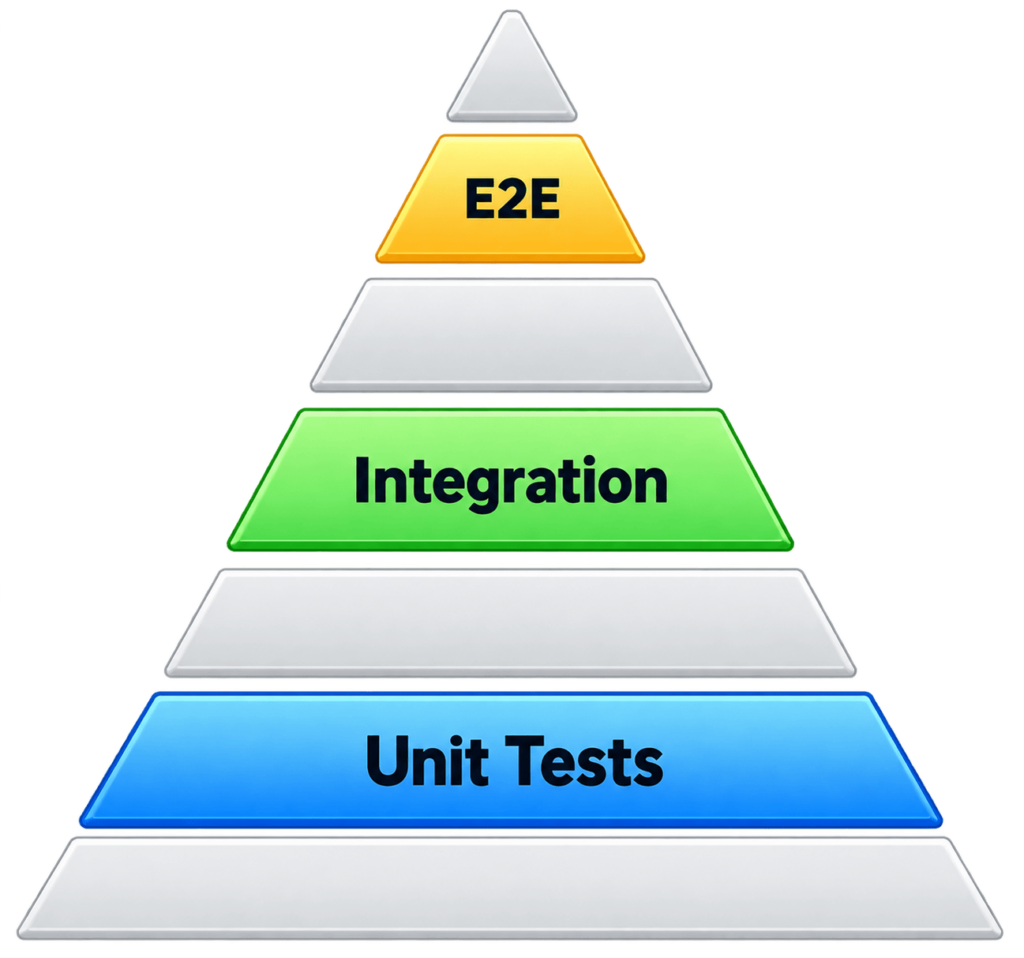
The exact shape and number of layers can vary between teams. The important idea is that different tests provide different types of confidence.
Unit tests are generally the fastest and easiest to run in large numbers.
Integration tests take more time because they involve multiple components.
End-to-end tests usually cover even larger workflows and can require more setup.
This does not mean a team should blindly follow a fixed ratio.
The right balance depends on the application.
How Many Unit Tests and Integration Tests Should You Have?
There is no universal number that works for every project.
A small application might need only a modest test suite.
A financial platform, healthcare application, or large SaaS product may need extensive coverage across multiple layers.
Instead of asking:
“Should we have 80% unit tests and 20% integration tests?”
ask:
“Which risks are most important in our application?”
For example, if your application contains complex business calculations, strong unit-test coverage is valuable.
If your application depends heavily on APIs, databases, queues, and external services, integration testing becomes especially important.
The goal is not to achieve an impressive test count.
The goal is to create useful tests that reduce real software risk.
Integration Testing Tools
The best integration-testing tool depends on your technology stack.
Some commonly used options include:
| Tool | Common Use |
| Testcontainers | Running real dependencies in containers |
| Supertest | Testing HTTP APIs in Node.js |
| Spring Boot Test | Integration testing Java/Spring applications |
| Playwright | Browser and application workflow testing |
| Selenium | Browser automation |
| Cypress | Web application testing |
| REST Assured | API testing in Java |
| pytest | Python testing, including integration scenarios |
Tools should support the team’s testing strategy rather than define it.
For example, Testcontainers can make it easier to test an application against realistic databases or other services in isolated environments.
When Should You Use Unit Testing?
Unit testing is especially useful when:
- Business logic is complex.
- Functions perform calculations.
- Input validation is important.
- You need very fast feedback.
- Developers frequently refactor code.
- Many edge cases must be checked.
- External services are expensive or unreliable to call.
A good unit test might check:
Input: 10 items
Expected: 10 items accepted
Then:
Input: -1 item
Expected: validation error
And:
Input: 0 items
Expected: appropriate business response
These small tests can catch problems before code reaches broader testing stages.
When Should You Use Integration Testing?
Integration testing becomes especially valuable when components depend on each other.
Use it when you need to verify:
- API-to-database communication
- Service-to-service communication
- Authentication flows
- Message queues
- Data persistence
- External API contracts
- Configuration
- Application startup
- Realistic workflows
For example, if your application has a payment system, testing only the payment calculation is not enough.
You also need confidence that the payment request is created correctly and that the application handles the response properly.
The Role of Mocking
Mocking is common in unit testing because it helps isolate the code under test.
Suppose your application has:
OrderService → PaymentServiceDuring a unit test, the payment service can be replaced by a mock.
The test can then ask:
“Does OrderService behave correctly when payment succeeds?”
or:
“Does OrderService handle a declined payment?”
This is useful.
However, if every test mocks every dependency, the team may never discover whether the real components actually communicate correctly.
That is where integration tests help.
A healthy strategy does not mean “mock everything” or “never mock anything.”
It means using mocks where isolation is useful and real dependencies where integration behavior needs to be verified.
Unit Testing and Integration Testing in CI/CD
Automated tests become even more valuable when connected to a CI/CD pipeline.
A typical workflow might look like this:
Developer writes code
        ↓
Pull Request
        ↓
Unit Tests
        ↓
Integration Tests
        ↓
Build
        ↓
Security Checks
        ↓
Deployment
Unit tests can provide rapid feedback early in the pipeline.
Integration tests can then validate deeper interactions.
For example, when a developer opens a pull request:
- Unit tests run first.
- Fast failures are reported.
- Integration tests run next.
- The build continues only if required tests pass.
- The application is deployed to the appropriate environment.
Automating tests helps prevent developers from relying entirely on manual testing.
How to Make Testing Faster Without Reducing Quality
Large test suites can become slow.
The answer is not always to remove tests.
Instead, improve how tests are organized.
Run Fast Tests First
Unit tests can run early because they are usually fast.
This gives developers feedback quickly.
Run Tests in Parallel
Independent tests can often run simultaneously.
Parallel execution can significantly reduce pipeline time when the test suite becomes large.
Keep Integration Environments Reproducible
Containerized test dependencies can help teams create consistent environments.
A developer should not have to manually configure a database before running the same integration test used in CI.
Remove Duplicate Tests
If five tests verify exactly the same behavior, the team may be wasting time.
Review the test suite regularly.
Focus on Risk
Not every line of code has equal importance.
Prioritize testing around:
- Critical business logic
- Payment flows
- Authentication
- Data integrity
- Important APIs
- Customer-facing workflows
- Security-sensitive functionality
Common Mistakes to Avoid
Mistake 1: Testing Only Happy Paths
A test that checks only successful behavior is incomplete.
Test what happens when:
- Input is missing.
- Input is invalid.
- A service is unavailable.
- A database operation fails.
- A user lacks permission.
- A payment is rejected.
Mistake 2: Treating Code Coverage as the Goal
High coverage does not automatically mean high-quality testing.
A test suite can execute 95% of the code while failing to check important business behavior.
Coverage is a useful measurement, but it should not become the only goal.
Mistake 3: Making Every Test an Integration Test
Integration tests are valuable, but using them for every small piece of logic can make a test suite unnecessarily slow.
Simple calculations and business rules are often better tested at the unit level.
Mistake 4: Mocking Everything
Excessive mocking can make tests disconnected from reality.
If the real database, API, or service behaves differently from the mock, the unit tests may still pass.
Mistake 5: Ignoring Test Maintenance
Tests are code too.
They need refactoring, cleanup, and review.
An outdated test suite can become a burden instead of an advantage.
A Practical Testing Strategy for Modern Applications
A balanced strategy might look like this:
Stage 1: Unit Tests
Test individual business rules and functions.
Focus on:
- Calculations
- Validation
- Transformations
- Conditions
- Error handling
Stage 2: Integration Tests
Test how important components communicate.
Focus on:
- APIs
- Databases
- Services
- Queues
- Authentication
- Data persistence
Stage 3: End-to-End Tests
Test important user workflows.
For example:
User signs in
     ↓
Searches for product
     ↓
Adds product to cart
     ↓
Checks out
     ↓
Makes payment
     ↓
Receives confirmation
Not every possible path needs to be tested end-to-end.
Focus on the workflows that matter most to users and the business.
How AI Is Changing Software Testing
Artificial intelligence is increasingly becoming part of modern software development.
AI tools can help developers generate initial test cases, identify possible edge cases, explain failures, and work with large existing codebases.
For example, a developer might provide a function and ask an AI coding tool to suggest tests for:
- Normal input
- Empty input
- Invalid input
- Boundary values
- Exception conditions
This can reduce repetitive work.
However, AI-generated tests should not automatically be trusted.
A generated test can be technically valid while testing the wrong behavior.
Human review remains important.
The developer still needs to ask:
Does this test represent what the application is actually supposed to do?
AI can help increase testing speed, but it does not remove the need for engineering judgment.
A Better Way to Think About Testing
Instead of thinking about unit testing and integration testing as competing options, think of them as different questions.
Unit testing asks:
“Is this small piece of code correct?”
Integration testing asks:
“Do these pieces work correctly together?”
End-to-end testing asks:
“Can the user successfully complete an important real-world workflow?”
These questions are related, but they are not identical.
A strong software testing strategy answers all three when appropriate.
Quick Decision Guide
Use this simple guide when deciding what type of test to write.
| Situation | Recommended Test |
| Testing a calculation | Unit test |
| Testing input validation | Unit test |
| Testing a single business rule | Unit test |
| Testing database interaction | Integration test |
| Testing API + database | Integration test |
| Testing service communication | Integration test |
| Testing complete customer workflow | End-to-end test |
| Testing edge cases in a function | Unit test |
| Testing authentication across services | Integration/E2E |
| Testing an external API contract | Integration test |
Final Thoughts
Unit testing and integration testing solve different problems, and both are valuable parts of a modern software testing strategy.
Unit tests provide fast feedback by checking individual components in isolation. They are excellent for business rules, calculations, validation, and other focused pieces of application logic.
Integration tests take a broader view. They verify that multiple components communicate and behave correctly when connected. This makes them particularly useful for APIs, databases, services, authentication systems, queues, and other dependencies.
The best approach is rarely to choose one and ignore the other.
Instead, build a layered strategy.
Start with fast and focused unit tests. Add integration tests around important boundaries and dependencies. Then use a smaller number of end-to-end tests for critical user journeys.
Your testing strategy should reflect the actual risks in your application.
If a function contains complicated business logic, test that logic thoroughly at the unit level. If an application relies heavily on databases and APIs, invest more effort in integration testing. If customers depend on a particular workflow, make sure that workflow is tested from the user’s perspective.
Ultimately, the goal of testing is not to produce the largest possible number of tests. It is to create enough meaningful evidence that your software behaves as expected.
When developers combine fast unit tests with targeted integration tests and automated CI/CD pipelines, they can catch problems earlier, make changes with greater confidence, and deliver more reliable software.
Conclusion
Good software testing is not about choosing between unit testing and integration testing.
It is about knowing what each method can prove.
Unit tests help developers verify individual pieces of code quickly. Integration tests verify that those pieces still work when connected to real or realistic dependencies.
When used together, they create a stronger safety net for software teams.
The most effective strategy is therefore simple: test small components deeply, test important integrations realistically, and automate the process wherever possible.
That approach gives development teams faster feedback without sacrificing confidence in how the complete system behaves.
FAQs
1. What is the main difference between unit testing and integration testing?
Unit testing checks a small part of an application independently, such as a function or class. Integration testing checks whether multiple components work correctly together, such as an API communicating with a database.
2. Is unit testing better than integration testing?
Neither is universally better. Unit testing is usually faster and easier to debug, while integration testing can find problems caused by communication between components. Most applications benefit from using both.
3. Are integration tests slower than unit tests?
Usually, yes. Integration tests may interact with databases, APIs, networks, containers, or other services. These dependencies require additional setup and processing, while unit tests normally run in isolation.
4. Should integration tests use real databases?
It depends on what you are trying to verify. If database behavior is important, using a real or realistic test database can reveal problems that mocks cannot. However, teams should avoid connecting tests to production data.
5. Can unit tests replace integration tests?
No. Unit tests cannot reliably verify that independently tested components communicate correctly. Integration tests provide another layer of confidence by checking those interactions.
6. Should unit tests run before integration tests?
In many CI/CD pipelines, yes. Unit tests are usually faster, so running them first can provide quick feedback and prevent unnecessary integration-test execution when basic logic already fails.
7. How many integration tests should a project have?
There is no universal number. The right amount depends on application complexity and risk. Focus integration tests on important boundaries such as APIs, databases, authentication, service communication, and critical workflows.