
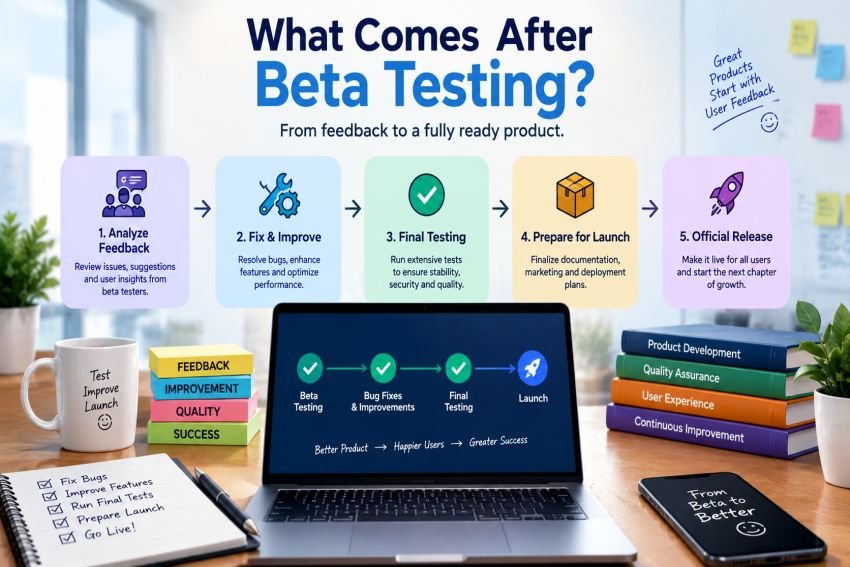

Beta testing is an important stage in software development. It gives real users a chance to test a product before its full release. Their feedback can reveal bugs, usability issues, performance problems, and other concerns that internal testing may miss.
But beta testing is not the end of the software testing process. So, What Comes After Beta Testing?
In most software projects, the next steps include reviewing feedback, fixing important issues, running regression tests, preparing a release candidate, and completing final release checks. The exact process can vary by product, team, and release strategy.
Understanding What Comes After Beta Testing helps development and QA teams create a smoother path from a test version to a stable production release.
What Happens Immediately After Beta Testing?
The first step is to collect and review all beta feedback.
Beta testers may report bugs, confusing features, slow pages, crashes, compatibility problems, or other issues. Teams should organize this feedback before making changes.
The development and QA teams usually group issues by severity and impact. Critical problems need attention first. Minor suggestions may wait for a future release.
This step helps the team understand whether the product is ready to move forward or needs another testing cycle.
1. Analyze Beta Tester Feedback
Beta testing can generate a large amount of information. Not every comment requires a code change.
Teams should review feedback based on factors such as:
- Bug severity
- Number of affected users
- Business impact
- Security risk
- User experience
- Reproducibility
- Product requirements
For example, a crash that affects many users should receive more attention than a small visual issue.
Teams should also look for patterns. If many testers report the same problem, the issue may have a higher priority than an isolated complaint.
2. Fix Critical Bugs and Issues
After reviewing the feedback, developers begin fixing important problems.
The goal is not always to fix every single issue before launch. Instead, teams usually focus on problems that could prevent the product from working correctly or safely.
Common fixes after beta testing include:
- Functional bugs
- Login problems
- Payment errors
- Broken links
- Performance issues
- Security weaknesses
- Compatibility problems
- Data handling errors
- User interface problems
Developers should document each important fix. This makes it easier for QA teams to verify the changes later.
3. Decide Which Features Should Change
Beta users often suggest new features. These suggestions can be valuable, but adding too many features at this stage can create new risks.
Teams should separate necessary fixes from new feature ideas.
A serious bug may need an immediate fix. A new feature may belong on the product roadmap instead.
This approach helps prevent scope expansion near the release date. It also allows the team to focus on product stability.
4. Run Regression Testing
Once developers fix beta issues, QA teams need to test the affected areas again.
This is where regression testing becomes important.
Regression testing checks whether recent changes have broken existing functionality. A fix for one problem can sometimes create another problem somewhere else.
For example, a developer may fix the checkout process but accidentally affect the shopping cart. Regression testing can help catch this type of issue.
Automated regression tests can make this process faster. Manual testing can then focus on areas that require human judgment.
5. Perform Additional Testing
After beta testing, teams may perform more focused testing before creating the final build.
The exact tests depend on the software. Common activities can include:
- Functional testing
- Integration testing
- System testing
- Performance testing
- Security testing
- Compatibility testing
- Usability testing
- Accessibility testing
- User acceptance testing
The purpose is to confirm that important requirements still work after the beta fixes.
A product may also need testing on different browsers, operating systems, screen sizes, devices, or network conditions.
6. Prepare the Release Candidate
One of the most common answers to What Comes After Beta Testing is the release candidate stage.
A release candidate, often called an RC, is a build that could become the final version if it passes the required checks.
At this point, teams usually avoid major new features. The focus shifts toward stability, verification, and final bug fixes.
For example, a project may use versions such as:
- Beta 1
- Beta 2
- RC1
- RC2
- Final Release
If a serious problem appears in RC1, the team may create RC2 after fixing and testing it.
The release candidate stage acts as a final checkpoint before production.
7. Conduct Release Candidate Testing
Release candidate testing focuses on the build that may become the final product.
QA teams test important user journeys and critical functions. They also verify that previously reported bugs have been resolved.
Typical checks include:
Functional Checks
QA confirms that important features work according to the requirements.
Regression Checks
The team makes sure recent fixes did not break existing features.
Performance Checks
The product is tested under expected workloads. Teams may check response times, resource use, and stability.
Security Checks
Security testing helps identify vulnerabilities that could create risks after launch.
Compatibility Checks
The product may be tested across supported browsers, devices, operating systems, and environments.
The exact testing mix depends on the product and its risk level.
8. Complete the Final Quality Review
After release candidate testing, the team reviews the overall quality of the build.
This review can include open defects, test results, known limitations, performance results, security findings, and release requirements.
The team should clearly define which issues must be fixed before launch.
Some low-risk defects may remain open. However, they should be documented and understood before the release decision.
A clear release checklist can help teams avoid missing important tasks.
9. Get Final Release Approval
Before production release, the appropriate stakeholders usually review the results.
Depending on the organization, this may involve:
- QA
- Developers
- Product managers
- Project managers
- Security teams
- Operations teams
- Business stakeholders
The team checks whether the release meets its acceptance criteria.
If important requirements remain incomplete, the release may need more work.
If the required criteria are met, the organization can approve the production release.
10. Prepare for Production
Passing testing does not mean the team should immediately push the software live.
Production preparation is another important step.
Teams may need to prepare:
- Deployment scripts
- Database changes
- Configuration settings
- Backup plans
- Monitoring tools
- Rollback procedures
- Documentation
- Customer communications
- Support information
A rollback plan is especially useful. If a serious issue appears after deployment, the team needs a safe way to restore the previous version.
11. Launch the Product
After final approval, the software can move into production.
The launch method depends on the product and its risk.
Some teams release the product to everyone at once. Others use a gradual rollout.
A gradual release can limit the number of users exposed to a new version at first. Teams can monitor the system and expand the rollout if everything works as expected.
Feature flags can also help teams control new functionality without immediately exposing every user to it.
12. Monitor the Product After Release
Testing does not stop when the product reaches production.
Real users may behave differently from testers. Production environments can also expose issues that did not appear during beta or release candidate testing.
After launch, teams should monitor areas such as:
- Error rates
- Application crashes
- Server performance
- Response times
- User activity
- Security alerts
- Customer complaints
- Support tickets
Monitoring helps teams identify problems quickly.
If a serious issue appears, the team can investigate, release a patch, or roll back the deployment when necessary.
13. Collect Post-Launch Feedback
The first production release is also a source of valuable information.
Users can provide feedback about features, performance, usability, and missing capabilities.
Teams should continue collecting this information and use it to improve future releases.
Not every request needs immediate action. Product teams can prioritize feedback based on user needs, business goals, technical effort, and risk.
This creates a continuous improvement cycle.
What Comes After Beta Testing in the Software Release Cycle?
The complete path can look like this:
Development → Alpha Testing → Beta Testing → Bug Fixes → Regression Testing → Release Candidate → Final Testing → Release Approval → Production Release → Monitoring
This sequence is not identical for every organization. Some teams may skip the release candidate stage. Others may run several release candidates before the final version.
For example, OpenMRS documentation notes that a project can move from beta to a release candidate or directly to a full release when the required testing and criteria are complete.
The key point is that beta testing provides evidence for the final release decision. It does not automatically mean the product is ready for everyone.
How to Know Your Product Is Ready for Release
A product may be ready for launch when:
- Critical bugs are resolved.
- Major beta feedback has been reviewed.
- Regression testing has passed.
- Required features work correctly.
- Security checks meet the team’s standards.
- Performance meets defined expectations.
- Release documentation is complete.
- Deployment plans are ready.
- Rollback procedures are available.
- Stakeholders approve the release.
Teams should use clear release criteria rather than relying only on a deadline.
Common Mistakes After Beta Testing
Some teams make avoidable mistakes after beta testing.
Ignoring Beta Feedback
User feedback provides real-world information. Ignoring repeated problems can create poor experiences after launch.
Adding Too Many New Features
Large feature changes can introduce new bugs. The final stages should focus heavily on stability.
Skipping Regression Testing
A new fix can affect an existing feature. Regression testing helps reduce this risk.
Releasing Without a Rollback Plan
A production issue can happen even after extensive testing. Teams should prepare for failure before deployment.
Stopping Testing After Launch
Production monitoring is part of responsible release management. Teams should continue watching the product after launch.
Conclusion
Understanding What Comes After Beta Testing helps teams move from real-user feedback to a controlled product launch. The process usually includes analyzing feedback, fixing important issues, running regression tests, preparing a release candidate, completing final checks, and getting release approval.
The work also continues after launch. Production monitoring and user feedback help teams find problems and plan future improvements. A careful process reduces release risk and creates a better experience for users.
The goal is not simply to finish beta testing. The goal is to use what the team learned during beta to deliver a stable, reliable, and useful product.
FAQs:
1. What Comes After Beta Testing?
What Comes After Beta Testing usually includes feedback analysis, bug fixes, regression testing, additional validation, and release candidate testing. The product may then receive final approval before production release.
2. Is a Release Candidate Always Needed After Beta Testing?
No. A release candidate is common, but it is not required for every project. Some teams can move from beta directly to a final release when their testing and release criteria are complete.
3. How Long Does the Process Take After Beta Testing?
There is no fixed timeline. It depends on the number and severity of bugs, product complexity, testing requirements, and release goals. A simple product may move quickly, while a complex system may need several testing cycles.
4. What Testing Should Happen After Beta Testing?
Teams may perform regression, functional, performance, security, compatibility, usability, and acceptance testing. The right combination depends on the product and its risks.
5. Can a Product Go Back to Beta After Testing?
Yes. If major problems appear during final testing, teams can return to development, fix the issues, and run another testing cycle. This is sometimes safer than releasing an unstable product.